> For clean Markdown of any page, append .md to the page URL.
> For a complete documentation index, see https://documentation.sayari.com/llms.txt.
> For AI client integration (Claude Code, Cursor, etc.), connect to the MCP server at https://documentation.sayari.com/_mcp/server.
# Project Entity Supply Chain Screening
> Monitor and assess risks in your global supply chain
## Summary
The Sayari API helps you monitor and assess risks in your global supply chain by:
- **Matching** your suppliers against Sayari's knowledge graph
- **Mapping** multi-tier supply chain relationships
- **Identifying** potential risks (direct, and indirect via upstream network effects)
- **Tracking** upstream product flows through HS codes and Sayari's Product Blueprint technology
- **Monitoring** risk changes over time with notifications for added or removed risks
---
## 5-Minute Quick Start
### What You'll Build
A simple supply chain monitor that checks a single supplier for risks.
**Prerequisites**
- Your API credentials (`client_id` and `client_secret`)
- A supplier to check (`name`, `address`, `country`)
First, authenticate with the Sayari API to get a bearer token.
**Token expires in 24 hours** - Store it securely and reuse it
Create a project container to organize your supplier entities.
**Key Response Fields:**
- `id`: this is the project_id we'll reference this key in the following requests
Match your supplier against Sayari's database to identify potential risks.
Read our [Understanding Project Entity](/api/guides/understanding-project-entity) guide to familiarize yourself with the core concepts of Project Entities.
To retrieve additional risk metadata such as descriptions, utilize the [Get Risk Factors](/api/api-reference/ontology/get-risk-factors) endpoint.
**Key Response Fields:**
- `project_entity_id`: Use for supply chain queries and to reference the project entity in other API calls
- `strength`: Match confidence (strong/partial/no_match)
- `risk_categories`: Array of risk categories
- `risk_factors`: Detailed risk identifiers
- `upstream.products`: HS codes of products handled by supplier
- `has_upstream`: Boolean indicating whether the supplier has upstream data
Get a high-level overview of your supplier's entire supply chain, including countries, risks, and products.
**Response contains:**
- `upstream.countries`: All countries in supply chain
- `upstream.risk_categories`: Categorized risks with factors
- `upstream.components`: Product HS codes present
Retrieve specific supply chain paths with detailed trade relationships, dates, and locations.
Track risk changes on your monitored entities by polling the notifications endpoint.
**Key Response Fields:**
- `resource_id`: This is your `project_entity_id`
- `risk_notifications.added`: New risks detected for the entity
- `risk_notifications.removed`: Risks that have been resolved or removed
- `risk_notifications.date`: When the risk change occurred
**Important Notes:**
- Parse the `risk_notifications` array, not the `notifications` array
- The `resource_id` field corresponds to your `project_entity_id`
- Poll this endpoint on a 24-hour cadence for optimal results
- The notifications endpoint is being enhanced but remains fully functional for production use
## Complete API Workflow
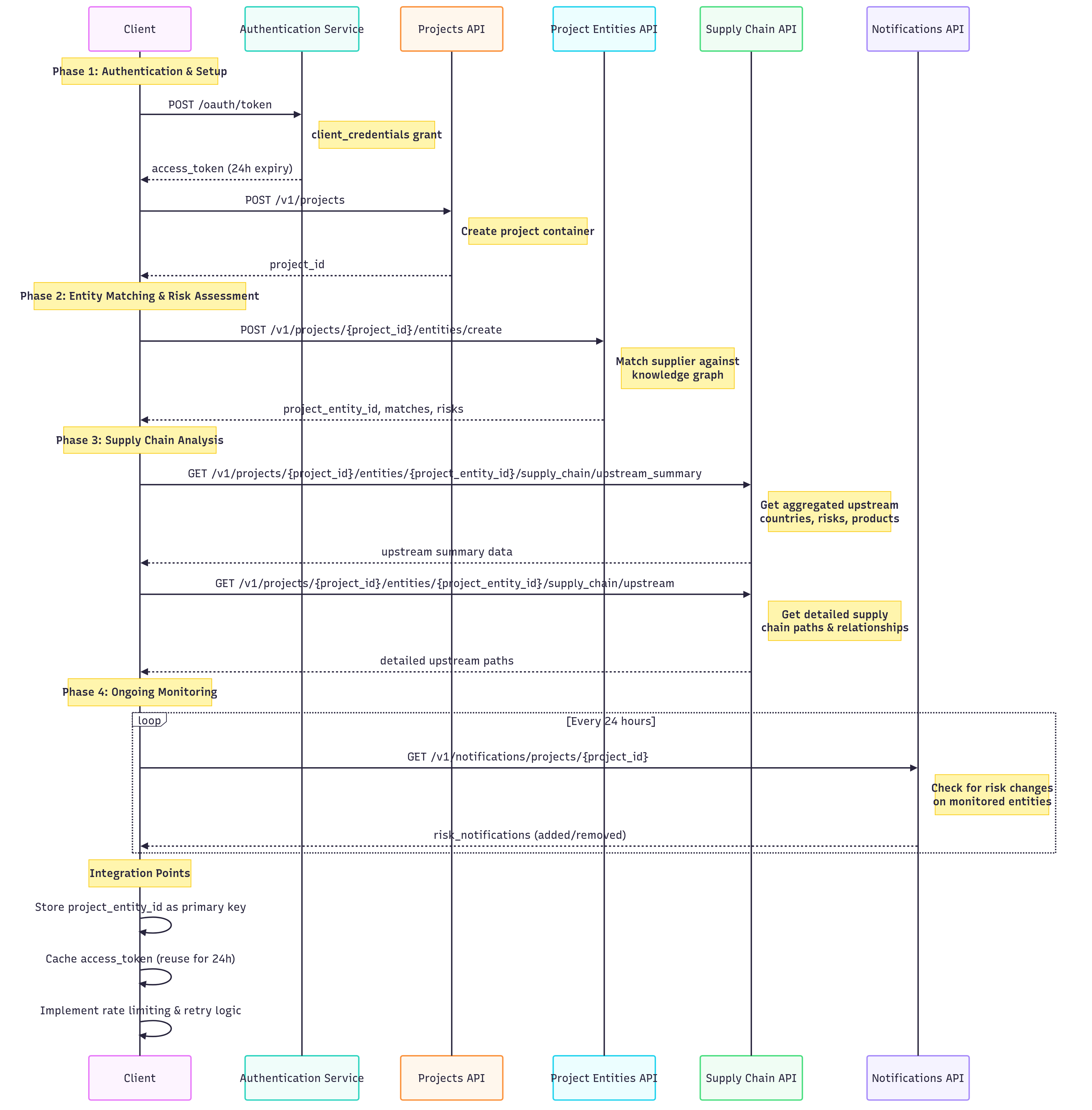 **POST** `/oauth/token` - Authenticate and get 24-hour access token
- **Input**: `client_id`, `client_secret`, `audience`, `grant_type`
- **Output**: Bearer token for API authentication
- **Expires**: 24 hours (cache and reuse)
**POST** `/v1/projects` - Create organizational container for suppliers
- **Input**: Project name and sharing settings
- **Output**: `project_id` for organizing entities
- **Purpose**: Groups related supplier entities together
**POST** `/v1/projects/{project_id}/entities/create` - Find and match suppliers in Sayari's knowledge graph
**Input Requirements:**
- `name` - Company name
- `address` - Physical address
- `country` - ISO country code (e.g., KHM)
- `identifier` (optional) - Tax ID, registration number
**Key Outputs:**
- `project_entity_id` - Unique identifier for API calls
- `strength` - Match confidence (`strong`/`partial`/`no_match`)
- `risk_categories` - Categorized risk factors
- `upstream.products` - HS codes of products handled
**GET** `/v1/projects/{project_id}/entities/{project_entity_id}/supply_chain/upstream_summary`
**Returns:**
- `upstream.countries` - All countries across supply tiers
- `upstream.risk_categories` - Risk factors by category
- `upstream.components` - Product HS codes present
- Aggregated view perfect for dashboards and reporting
**GET** `/v1/projects/{project_id}/entities/{project_entity_id}/supply_chain/upstream`
**Returns:**
- Specific supplier-to-supplier relationships
- Trade dates and shipment countries by tier
- Component-level HS code flows
- Entity details with risk factors
**GET** `/v1/notifications/projects/{project_id}` - Check for risk changes on monitored entities
**Polling Cadence:**
- Recommended: Every 24 hours
- Maximum: Every hour (respect rate limits)
**Response Processing:**
- `resource_id` maps to `project_entity_id`
- `risk_notifications.added` contains new risks
- `risk_notifications.removed` contains resolved risks
- `risk_notifications.date` shows when changes occurred
**Integration Tips:**
- Set up scheduled jobs/cron for automated polling
- Send alerts to compliance teams for new critical risks
- Update internal risk dashboards automatically
- Log all risk changes for audit trails
---
## Understanding the Response Data
### Match Confidence Levels
**POST** `/oauth/token` - Authenticate and get 24-hour access token
- **Input**: `client_id`, `client_secret`, `audience`, `grant_type`
- **Output**: Bearer token for API authentication
- **Expires**: 24 hours (cache and reuse)
**POST** `/v1/projects` - Create organizational container for suppliers
- **Input**: Project name and sharing settings
- **Output**: `project_id` for organizing entities
- **Purpose**: Groups related supplier entities together
**POST** `/v1/projects/{project_id}/entities/create` - Find and match suppliers in Sayari's knowledge graph
**Input Requirements:**
- `name` - Company name
- `address` - Physical address
- `country` - ISO country code (e.g., KHM)
- `identifier` (optional) - Tax ID, registration number
**Key Outputs:**
- `project_entity_id` - Unique identifier for API calls
- `strength` - Match confidence (`strong`/`partial`/`no_match`)
- `risk_categories` - Categorized risk factors
- `upstream.products` - HS codes of products handled
**GET** `/v1/projects/{project_id}/entities/{project_entity_id}/supply_chain/upstream_summary`
**Returns:**
- `upstream.countries` - All countries across supply tiers
- `upstream.risk_categories` - Risk factors by category
- `upstream.components` - Product HS codes present
- Aggregated view perfect for dashboards and reporting
**GET** `/v1/projects/{project_id}/entities/{project_entity_id}/supply_chain/upstream`
**Returns:**
- Specific supplier-to-supplier relationships
- Trade dates and shipment countries by tier
- Component-level HS code flows
- Entity details with risk factors
**GET** `/v1/notifications/projects/{project_id}` - Check for risk changes on monitored entities
**Polling Cadence:**
- Recommended: Every 24 hours
- Maximum: Every hour (respect rate limits)
**Response Processing:**
- `resource_id` maps to `project_entity_id`
- `risk_notifications.added` contains new risks
- `risk_notifications.removed` contains resolved risks
- `risk_notifications.date` shows when changes occurred
**Integration Tips:**
- Set up scheduled jobs/cron for automated polling
- Send alerts to compliance teams for new critical risks
- Update internal risk dashboards automatically
- Log all risk changes for audit trails
---
## Understanding the Response Data
### Match Confidence Levels
| Strength |
Meaning |
| **strong** |
High confidence match |
| **partial** |
Medium confidence match |
| **no_match** |
No suitable match found |
### Risk Categories Explained
For a complete list of risk factors and their definitions, see the [Risk Factor Table](/library/ontology/risk-factors/risk-table) in our library documentation.
| Risk Category | What It Means |
|-----------|---------------|
| **forced_labor** | UFLPA, Xinjiang, WRO associations |
| **environmental** | EUDR violations, deforestation |
| **sanctions** | OFAC, EU, UN sanctions |
| **export_controls** | Dual-use, military end-use |
| **regulatory_action** | Regulatory violations |
| **political_exposure** | PEP connections, SOE links |
| **adverse_media** | Negative news coverage |
### Understanding HS Codes
HS Codes are classifications used in international trade to identify specific products and materials. For more details, see the [HS Codes endpoint. The endpoint currently accepts HS Codes up to 4 digits at the sub-chapter level](/api/api-reference/ontology/get-hs-codes).
- **6004**: Knitted fabrics with elastane
- **5201**: Raw cotton
- **3907**: Polyacetals and polyesters
- **5402**: Synthetic filament yarn
- **6001**: Pile fabrics, knitted or crocheted
### Interpreting Supply Chain Paths
Supply chain paths show the specific trade relationships and flow of goods from your supplier up through multiple tiers. Here's how to read the path structure:
Each path represents a complete supply chain route from your matched supplier to upstream entities:
```json
{
"source_entity_id": "e0WEtIhAvDUjWs-hg12jSA", // Your matched supplier
"path": [ // Array of upstream connections
{
"tier": 2, // Supply chain tier (2-5)
"entity_id": "bWbImzpaFHN-4tj9n8JXzg", // Upstream supplier ID
"components": [...] // Products/materials traded
},
{
"tier": 3, // Next tier upstream
"entity_id": "_jCU70ygP5Vx0kheGGxniw", // Another upstream supplier
"components": [...] // Different products/materials
}
]
}
```
**Supply chain tiers** represent the distance from your supplier:
- **Tier 1**: Your matched supplier (source_entity_id)
- **Tier 2**: Direct Suppliers to your matched supplier
- **Tier 3**: Suppliers to your Tier 2 suppliers
- **Tier 4**: Suppliers to your Tier 3 suppliers
- **Tier 5**: Suppliers to your Tier 4 suppliers
Each **component** represents a traded product or material:
```json
{
"hs_code": "6004", // Product classification
"arrival_countries": ["KHM"], // Where goods arrived
"departure_countries": ["CHN"], // Where goods originated
"min_date": "2023-01-01", // Earliest trade date
"max_date": "2024-12-31" // Latest trade date
}
```
**Key Points:**
- `hs_code` identifies the specific product (e.g., "6004" = knitted fabrics)
- `arrival_countries` shows arrival countries / areas of import
- `departure_countries` shows departure countries / areas of export
- Date range shows when these trades occurred
**Example Path Interpretation:**
```json
{
"source_entity_id": "e0WEtIhAvDUjWs-hg12jSA", // Marvel Garment (Cambodia)
"path": [
{
"tier": 2,
"entity_id": "bWbImzpaFHN-4tj9n8JXzg", // Vietnamese textile supplier
"components": [
{
"hs_code": "6004", // Knitted fabrics with elastane
"arrival_countries": ["KHM"], // Shipped TO Cambodia
"departure_countries": ["VNM"], // Shipped FROM Vietnam
"min_date": "2023-01-01",
"max_date": "2024-12-31"
}
]
},
{
"tier": 3,
"entity_id": "_jCU70ygP5Vx0kheGGxniw", // Vietnamese yarn supplier
"components": [
{
"hs_code": "5402", // Synthetic filament yarn
"arrival_countries": ["VNM"], // Shipped TO Vietnam
"departure_countries": ["VNM"], // Shipped FROM Vietnam (domestic)
"min_date": "2023-01-01",
"max_date": "2025-01-17"
}
]
},
{
"tier": 4,
"entity_id": "dRvTdx1af-XrFqh9L3Y4-Q", // Japanese chemical supplier
"components": [
{
"hs_code": "3907", // Polyacetals and polyesters
"arrival_countries": ["VNM"], // Shipped TO Vietnam
"departure_countries": ["JPN"], // Shipped FROM Japan
"min_date": "2023-01-16",
"max_date": "2025-01-24"
}
]
},
{
"tier": 5,
"entity_id": "FFXyR4N57IZuQDTH2pzYTQ", // US chemical company
"components": [
{
"hs_code": "2909", // Chemical compounds
"arrival_countries": ["JPN"], // Shipped TO Japan
"departure_countries": ["USA"], // Shipped FROM USA
"min_date": "2023-06-24",
"max_date": "2023-08-11"
}
]
}
]
}
```
**This tells us:**
- Marvel Garment (e0WEtIhAvDUjWs-hg12jSA) has a complex 5-tier supply chain
- **Tier 2**: Sources knitted fabrics (HS 6004) from Vietnam to Cambodia
- **Tier 3**: Vietnamese supplier sources synthetic yarn (HS 5402) domestically
- **Tier 4**: Japanese supplier provides polyester materials (HS 3907) to Vietnam
- **Tier 5**: US chemical company supplies raw chemicals (HS 2909) to Japan
- Supply chain spans multiple countries: USA → Japan → Vietnam → Cambodia
---
## Best Practices
- **Batch suppliers** - Add multiple suppliers per project
- **Filter early** - Use parameters to reduce response size
- **Store project Entity IDs** - Store Project Entity Ids, they are reliable and stable
- **Be mindful of rate limits** - Utilize rate limiting strategies such as exponential backoff and retry mechanisms
- **Provide identifiers** - When possible, provide identifiers to return more accurate, precise matches
- **Use ISO country codes** - KHM not Cambodia
---
## Additional Resources
### API Documentation Links
- **Authentication**: [Get Token Endpoint](/api/api-reference/auth/get-token)
- **Projects**: [Create Project](/api/api-reference/project/create-project)
- **Entity Matching**: [Create Project Entity](/api/api-reference/project-entity/create-project-entity)
- **Supply Chain Analysis**:
- [Upstream Summary](/api/api-reference/project-entity/project-entity-supply-chain-summary)
- [Upstream Details](/api/api-reference/project-entity/project-entity-supply-chain)
- **Monitoring**: [Project Notifications](/api/api-reference/notifications/project-notifications)
- **Risk Definitions**: [Risk Factor Table](/library/ontology/risk-factors/risk-table)
- **Rate Limits**: [Rate Limits](/api/api-reference/rate-limits)
- **Response Codes**: [Response Codes](/api/api-reference/response-codes)
- **Understanding Project Entity**: [Understanding Project Entity](/api/guides/understanding-project-entity)
---
*Last Updated: August 2025*